


Symbol AA26100L 9V 2A Power Adapter – 1.8mm x 4.0mm DC Pin
Pickup available at Digilog Electronics
Usually ready in 2 hours

Symbol AA26100L 9V 2A Power Adapter
The Symbol AA26100L 9V 2A Power Adapter is a power accessory identified by its AA26100L model number and stated 9V, 2A output specification. If you are replacing an existing adapter, start with these details, then compare the connector and polarity with the equipment you intend to power. A replacement should be selected by its electrical requirements and physical connection, not by appearance alone.
This listing provides a practical guide to checking the adapter against your requirements before ordering. The model name and output rating help narrow your search, while the compatibility guidance below explains which additional details need attention. A clear match is especially important when several adapters look similar but have different output voltages, connector dimensions or wiring arrangements.
Product Identification
- Brand: Symbol
- Model reference: AA26100L
- Product type: Power adapter
- Stated output voltage: 9V
- Stated output current: 2A
- Seller-listed connector size: 4.0 mm outer diameter × 1.8 mm inner diameter; barrel length: 9.5 mm.
- Selection priority: Match the device requirements, connector and polarity before use.
Connector dimensions are based on an external seller's AA26100L listing, not manufacturer confirmation or a measurement of this item. Verify the actual connector before ordering or use.
The information above reflects the product details supplied for this listing. It does not establish compatibility with every Symbol device or with equipment from another manufacturer. Where your device documentation calls for a specific adapter part number, compare that reference with the complete label on the adapter rather than relying only on the product title.
A Practical Starting Point for Replacement Searches
A missing or damaged adapter can leave otherwise usable equipment waiting for the correct power supply. The AA26100L model reference gives you a specific starting point when checking a replacement. Keep the original adapter nearby if you still have it, and compare its label with the device documentation. If the old adapter is missing, check the power-input information printed on the equipment or in its manual.
Before ordering, write down the voltage, required current, output type, connector dimensions and polarity specified for your device. Keeping these details together makes it easier to compare products accurately. If any essential information is missing or difficult to read, resolve it before connecting a replacement. Guessing from a familiar-looking plug is not a reliable way to establish a match.
Understanding the 9V Output Specification
The stated output voltage for this product is 9V. Your equipment must be designed for the matching voltage and output type specified by its manufacturer. A connector that fits into a power socket does not demonstrate that the voltage is suitable. Two adapters can share a similar housing and plug while supplying different electrical outputs.
Read the input requirements on the device itself rather than assuming that all accessories bearing the same brand use the same power supply. If the label is worn, consult the device manual or request confirmation for the exact equipment model. Do not treat a nearby voltage rating as an acceptable substitute unless the equipment manufacturer explicitly permits it.
Understanding the 2A Current Rating
The supplied product specification states a 2A output current rating. Compare this with the current requirement listed for your equipment, following the device manufacturer's guidance. Current rating is one part of the selection process; it cannot compensate for a mismatch in voltage, polarity, output type or connector construction.
When comparing labels, pay attention to units and to which rating describes the output. An adapter label may show separate input and output information, and these serve different purposes. If you are uncertain which number applies to the device connection, ask for assistance with a clear photograph of both labels rather than choosing an adapter based on a single number.
Check the Output Type
Confirm whether your equipment requires AC or DC at its power-input socket, and verify that the adapter label specifies the matching output type. The product name alone should not be used to infer this detail. Electrical symbols on the adapter and device labels can provide the information needed, but they must be read correctly and compared with the manufacturer's requirements.
If the required output type is unclear, pause the purchase decision until it has been confirmed. A matching voltage number and a similar connector are not sufficient on their own. This listing does not add an AC or DC output claim because that detail has not been independently confirmed from the adapter label.
Connector Fit Matters
Check the connector dimensions and the construction of the device's power socket before ordering. With barrel-style connections, the outside diameter, inside diameter and insertion length can all matter. A plug may look close to the required size in a photograph without making a suitable connection in practice. Obtain the device's specified connector dimensions where possible.
Do not force a plug into a socket or modify the connector to make it fit. A correctly selected replacement should match the connection specified for the equipment. If a plug feels loose, fails to seat as intended or requires unusual pressure, stop and recheck the specifications. Physical fit should be confirmed together with the electrical requirements, not considered separately.
Verify Polarity Before Connection
For equipment using a polarity-sensitive connection, compare the polarity marking on the device with the adapter's output marking. Similar-looking plugs can have different polarity arrangements. The exterior appearance of the adapter does not reveal how its output contacts are wired, so a photograph of the housing is not enough to establish polarity.
This listing does not assign a centre-positive or centre-negative polarity without a confirmed label reference. If your device requires a particular arrangement, verify it explicitly before purchase and again before first use. Never assume polarity from the brand name, the colour of a connector or the appearance of an adapter you have used previously.
Confirm the Mains Input Separately
The 9V, 2A specification describes the stated output side of this product, not its mains-input requirements. Check the adapter label for its supported input voltage and frequency before connecting it to a wall supply. The label should be the reference for determining whether the adapter is suitable for the supply where it will be used.
Do not assume that this adapter has universal mains input or a particular supported voltage range. Those details have not been confirmed for this listing. Likewise, confirm the mains lead and plug arrangement required for your location. A suitable output for the device does not remove the need to check the input side of the adapter.
Check What Is Included
Confirm the package contents before placing an order if you need a separate mains lead or any additional accessory. A product photograph can help identify the adapter's appearance, but it should not be treated as confirmation that every cable or accessory you may need is included. Ask specifically about the mains lead if it is essential for your setup.
No additional connector tips, conversion accessories, mounting pieces or extension leads are promised by this description. If your installation requires a particular cable length or plug style, request confirmation of the supplied item before ordering. This avoids planning a setup around an accessory or dimension that has not been specified.
Use the Exact Equipment Model When Checking Compatibility
When asking whether this adapter will work with your equipment, provide the full device model number, not only the brand or the general type of device. Products within the same brand family may use different power arrangements. The most useful compatibility information is normally found on the device's power-input label and in its manufacturer's documentation.
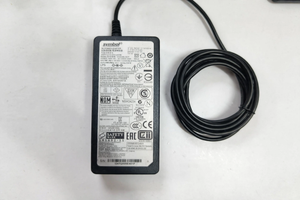
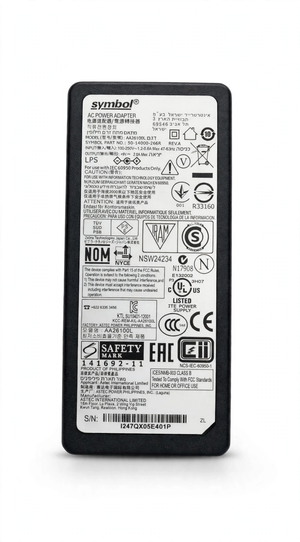
A clear image of your original adapter label can also help compare the model reference and electrical specifications. If there is a difference between the old adapter and the device requirements, do not assume the old adapter was correct. Use the equipment manufacturer's stated requirements as the reference and seek clarification where necessary.
Why Appearance Alone Is Not Enough
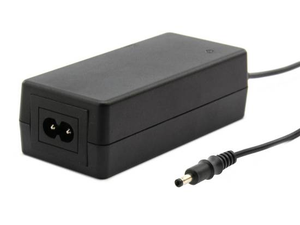
Power adapters often use similar rectangular housings, dark finishes and familiar cable connections. These shared design features make photographs helpful for recognising a product, but not for proving electrical compatibility. The information printed on the labels is more important than whether the replacement resembles the adapter currently on your desk.
Use the product image as a visual reference alongside the model and specification details. Do not estimate connector dimensions from an image without a reliable scale, and do not infer cable length or housing measurements from perspective. If a physical measurement affects your purchase, request that measurement directly before making a decision.
Planning a Replacement for an Existing Setup
Before removing an existing adapter, note how the equipment and cables are arranged. Check whether the power connection needs clearance behind a counter, shelf or workstation. Even when electrical specifications match, the connector and cable must be able to sit naturally without being pulled sharply or pressed against surrounding furniture.
Allow enough room for the adapter and its cables, following the manufacturer's installation guidance. Avoid choosing a location that places strain on the device socket. Cable routing is worth considering before ordering if the power source is some distance from the equipment, because no cable-length specification is confirmed in this listing.
Receiving and Checking Your Adapter
When the item arrives, compare the model and output information printed on the supplied adapter with the details you checked before purchase. Inspect the housing, connector and cable for visible damage before use. If the label differs from what you expected or an important specification is unclear, resolve the issue before connecting it to your equipment.
Do not use an adapter with exposed wiring, a broken housing or a damaged connector. If the equipment behaves unexpectedly after connection, stop using the setup and have the compatibility and condition checked. Avoid repeatedly reconnecting a questionable power supply in the hope that an intermittent connection will correct itself.
Everyday Handling and Cable Care
Handle the adapter and its cables carefully, and disconnect by holding the appropriate plug rather than pulling on the wire. Avoid tight bends immediately beside the connector or where the cable enters the adapter housing. Arrange cables so they are not trapped beneath heavy objects or repeatedly caught by moving equipment.
Keep the adapter away from liquids and use it only in conditions permitted by its manufacturer. Do not open the housing or attempt internal repairs. If a cable, plug or housing becomes damaged, have the item assessed by a qualified technician or replace it with a correctly specified unit. No water-resistance or outdoor-use rating is claimed here.
Keep the Adapter Identifiable
If you use several power adapters in the same workspace, keep a record of which adapter belongs with each device. A small equipment record containing the device model and approved power requirements can reduce confusion when desks are moved or cables are disconnected. Keep the adapter label visible and readable wherever possible.
Do not swap adapters between devices simply because the plugs fit. Recheck the full requirements whenever you change the equipment attached to a power supply. A previous successful connection to one item does not establish compatibility with a different model, even if both devices share the same brand name.
Frequently Asked Questions
What model is listed?
This listing is for the Symbol AA26100L power adapter, with a stated output specification of 9V and 2A. Compare the full reference and label information with your requirements before ordering.
Will it work with every Symbol device?
Compatibility with every Symbol device is not established. Check the exact equipment model, required voltage, current, output type, connector dimensions and polarity. A shared brand is not a compatibility guarantee.
Can I choose it because the plug looks right?
No. Connector appearance is only one part of the comparison. The electrical specifications and polarity must also match the requirements for your equipment, and the connector dimensions need to be confirmed.
What is the connector size?
An external seller lists the AA26100L connector as 4.0 mm outer diameter × 1.8 mm inner diameter, with a 9.5 mm barrel length. These dimensions have not been confirmed by the manufacturer or by measuring this item. Verify the actual connector before purchase or use.
Is a mains lead included?
Package contents have not been specified here. Confirm whether the required mains lead is included and whether its plug arrangement is suitable for your setup before placing an order.
Does the listing confirm universal input?
No mains-input range is claimed in this description. Check the input voltage and frequency shown on the adapter label before connecting it to the wall supply.
Are safety certifications or protection features confirmed?
No specific certifications, efficiency rating or internal protection features are claimed without supporting product information. Request the relevant label or manufacturer documentation if those details are required for your purchase.
What should I share when asking for compatibility assistance?
Provide the exact equipment model and clear photographs of its power-input label and your original adapter label, if available. Include the required connector measurements where these are documented.
Before You Order
- Compare the AA26100L reference with your original adapter or equipment documentation.
- Confirm that 9V is the required output voltage for the device.
- Check the device's current requirement against the stated 2A rating.
- Verify the required AC or DC output type.
- Confirm the connector dimensions, insertion fit and polarity.
- Check the adapter's mains-input requirements and the required mains lead.
- Ask about package contents, cable length and any physical dimensions important to your setup.
The Symbol AA26100L 9V 2A Power Adapter should be selected through a complete specification match. Use the model reference and stated output rating as your starting point, then confirm the remaining connection and input details. Checking these points before purchase helps you choose a replacement based on your equipment's actual requirements rather than assumptions.