


Raspberry Pi Pico 2 RP2350A Development Board USB-C for MicroPython
Raspberry Pi Pico 2 — Pakistan ka sabse powerful aur affordable microcontroller board, RP2350A chip ke saath. Students, engineers, aur hobbyists ke liye perfect choice for IoT, robotics, aur FYP projects.
Specifications
| Field | Detail |
|---|---|
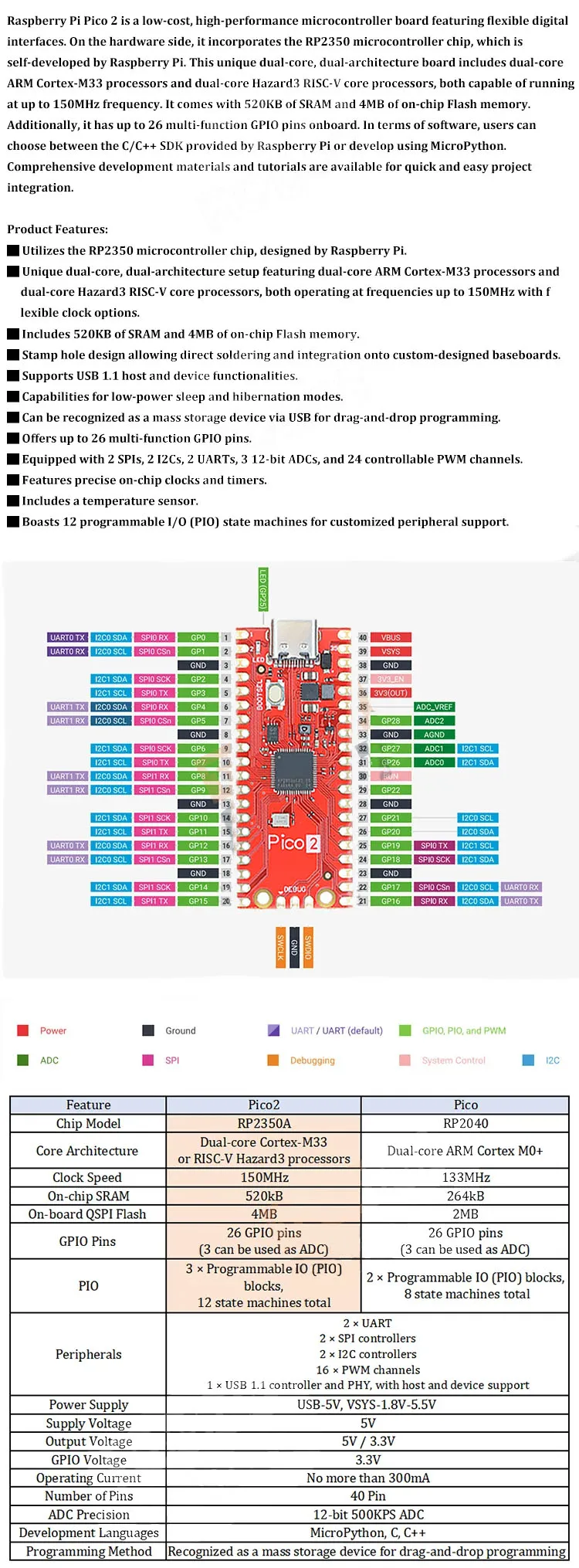
| Chip / Part No. | RP2350A |
| Core Architecture | Dual-core ARM Cortex-M33 or dual Hazard3 RISC-V @ 150MHz |
| On-chip SRAM | 520 KB |
| On-board Flash | 4 MB QSPI Flash |
| GPIO Pins | 26 multi-function GPIO (3 usable as ADC) |
| ADC | 3 × 12-bit ADC channels |
| PWM Channels | 16 |
| PIO State Machines | 12 (3 × PIO blocks) |
| UART | 2 × UART |
| SPI | 2 × SPI controllers |
| I2C | 2 × I2C controllers |
| USB | USB-C, USB 1.1 host & device support |
| Operating Voltage (Input) | 1.8V – 5.5V DC |
| GPIO Voltage | 3.3V |
| Operating Temperature | -20°C to +85°C |
| Programming | MicroPython, C/C++ SDK, Drag-and-drop via USB |
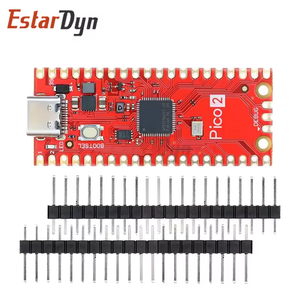
| Form Factor | Castellated module (solderable to carrier boards) |
| Dimensions | 51mm × 21mm [VERIFY] |
| Security | ARM TrustZone, Boot signing, OTP key storage, SHA-256 accelerator |
| Production Guarantee | Until at least January 2040 |
Kahan Use Hota Hai (Use Cases)
- 🏠 Smart Home Automation: Relay control, sensor interfacing, aur Wi-Fi ke saath home automation (Pico 2 W ke saath).
- 🤖 Robotics & Motor Control: Stepper aur DC motor drivers ke saath FYP-level robot projects.
- 📡 IoT Data Logging: Temperature, humidity, aur environmental sensors ka data log karna aur cloud pe bhejna.
- 🎓 College Lab Projects (BSEE/BSCS): Digital electronics, embedded systems, aur microcontroller labs ke liye ideal.
- ⚙️ Industrial Monitoring: ADC inputs se analog sensors read karna — pressure, current, voltage monitoring.
- 🎮 Custom HID Devices: USB host/device support se custom keyboards, gamepads, aur USB gadgets banana.
Kaise Connect Karein (Basic Wiring)
// MicroPython — LED Blink
from machine import Pin
import time

led = Pin(25, Pin.OUT)   # GP25 = Onboard LED [VERIFY]
while True:
    led.toggle()
    time.sleep(0.5)

// DHT22 on GP15:
// VCC  → Pin 36 (3V3)
// GND  → Pin 38 (GND)
// DATA → GP15 (Pin 20) [VERIFY]

// I2C OLED (SSD1306):
// SDA → GP4 (Pin 6) [VERIFY]
// SCL → GP5 (Pin 7) [VERIFY]
Aksar Pooche Jane Wale Sawal (FAQ)
Q: Kya Pico 2 Arduino Uno ke saath compatible hai?
A: Not pin-compatible with Arduino shields, but supports MicroPython and C/C++ SDK. Most Arduino sensor projects can be replicated easily.
Q: Voltage kitni supply karni chahiye?
A: 1.8V–5.5V via VSYS, or 5V via USB-C. GPIO is 3.3V — do NOT connect 5V signals directly without a level shifter.
Q: MicroPython kaise install karein?
A: Hold BOOTSEL, connect USB-C — a USB drive appears. Download Pico 2 .uf2 from raspberrypi.com and drag-and-drop. Done!
Q: Kya Pico 1 projects kaam karenge?
A: Yes! Pico 2 is fully software- and hardware-compatible with Pico 1.
Q: Is mein Wi-Fi hai?
A: No. This is the standard Pico 2 (no wireless). For Wi-Fi/BT, you need the Pico 2 W variant.
📦 Delivery: Fast shipping — Karachi, Lahore, Islamabad, Peshawar, Quetta & all cities. COD available. | digilog.pk